How to check grammar in a LaTeX document: every option compared
By Shihab Shahriar Antor · Updated November 2026 · 8 min read
A plain grammar checker reads LaTeX commands as words, so the options that work are the ones that understand the markup. In Overleaf that is its own language suggestions by Writefull, or the LanguageTool browser add-on. On your own computer it is TeXstudio or LTeX+ in VS Code, both built on LanguageTool, or TeXtidote on the command line. LetX has a grammar check built into its editor. Grammarly does not support LaTeX files.
The options side by side
| Option | Where it runs | What you need | Languages | Cost, as its own page states it |
|---|---|---|---|---|
| Overleaf language suggestions (by Writefull) | In the Overleaf editor | AI features switched on in your Overleaf account settings | English with the Writefull model; other languages with a GPT model | Free within daily limits; a paid Overleaf plan raises them |
| LanguageTool add-on | Your browser, on overleaf.com | The add-on for Chrome, Edge, Firefox or Opera | More than 30 languages and dialects | Free for spelling, simple punctuation and some style mistakes; Premium for all errors |
| TeXstudio | A desktop editor | A separate installation of LanguageTool and Java | LanguageTool’s | Free and open source |
| LTeX+ | Visual Studio Code | The extension; it comes with everything included | LanguageTool’s | Free and open source |
| TeXtidote | The command line | Java 8 or later | About a dozen | Free and open source |
| Trinka | Its website: you upload the file | An account | See its page | Credits; the Basic plan includes a few each month |
| LetX | In the LetX editor | A Pro plan; spell check is free | English, German, French, Spanish and many more | Part of Pro, Academic Pro, Team and Institution |
Each row is what the product’s own page said on 23 November 2026, linked in its section below. Prices that only load inside a browser, and anything a vendor’s pages do not state, are left out. These pages change: check them before you decide.
Why a plain grammar checker trips over LaTeX
A grammar checker expects sentences. A LaTeX file gives it sentences with commands, formulas, citation keys and labels in the middle of them, and a checker that reads those as words reports a mistake at nearly every one. LanguageTool says so itself: “LanguageTool does not support stripping TeX formatting markup, so we recommend using external tools” (its page on checking LaTeX). The tools it recommends there are the ones on this page: the add-on in Overleaf, TeXtidote, TeXstudio and LTeX+.
The model reaches 93.4 percent accuracy \cite{rahman2024}. However we found
that training takes a hour longer on the the larger corpus, where $n > 10^6$.So the question to ask of any option is not which engine it uses, since most of them use LanguageTool, but how it handles the markup: whether it leaves commands and maths out, and whether it can still judge the sentence around a citation.
If you write in Overleaf
Overleaf’s own language suggestions, by Writefull
Overleaf has a built-in spell checker, and its grammar checking is part of its AI features: “language suggestions (by Writefull)”, which its AI features page describes as suggestions “to improve grammar, spelling, word choice, and sentence structure”. The same page says “Overleaf and Writefull are both part of Digital Science”. You switch the AI features on in your account settings, and Overleaf’s documentation says they are “available for free within daily limits”, with more on a paid plan. Each use of a language tool counts against the day’s allowance.
Two things to know. Writefull’s own model reads English only: its guide says “The Writefull model can be used on English texts only, while GPT works with any language.” And the same guide adds: “if you use GPT, your text is sent to OpenAI’s servers.” If your paper is in German or Spanish, that is the model you would be choosing.
The LanguageTool browser add-on
LanguageTool publishes a grammar checker for Overleaf: a browser add-on for Chrome, Edge, Firefox and Opera that underlines mistakes in Overleaf’s editor in “more than 30 languages and dialects”. Its page is plain about the two tiers: “The free version corrects spelling as well as simple punctuation and some style mistakes”, and “Only the Premium version will show you all errors”. What its pages do not say today is which of Overleaf’s two editors, the code editor or the visual one, it works in, so try it in yours before you rely on it.
Grammarly
Grammarly’s support page says: “At this time, PDF, Latex, and Markdown file formats are not supported.” Its browser extension does show suggestions in Overleaf, and Overleaf’s documentation is careful about it: Grammarly is “not directly integrated with Overleaf”, the instructions “do not represent official support”, and “Grammarly does not fully understand LaTeX markup, occasionally resulting in erroneous suggestions”.
If you write on your own computer
LTeX+ in Visual Studio Code
LTeX+ is a free extension that “provides offline grammar checking of various markup languages in Visual Studio Code using LanguageTool”. It reads LaTeX, BibTeX, Markdown, Typst and more, it “comes with everything included, no need to install Java or LanguageTool”, and its list of features says “Offline checking: Does not upload anything to the internet”. For an unpublished paper that last line matters. If you still have the original LTeX installed, move: its repository was archived by its owner on 12 April 2026, and LTeX+ is where the work continues.
TeXstudio
TeXstudio has grammar checking in the editor, with a condition. Its manual says the checker “is based on the standard http API of LanguageTool, and requires a separate installation of LanguageTool and java”. Once both are installed, LanguageTool runs as a local server on your machine and TeXstudio connects to it when it starts. The check then runs on your own machine, and keeping LanguageTool up to date is your job.
TeXtidote
TeXtidote is a command-line tool: it removes the markup from a .tex file, hands the text to the LanguageTool library, and, in its own words, can “translate the messages from Language Tool back to their proper location directly in your source file”. It needs Java 8 or later and writes its report as a web page or in the terminal:
java -jar textidote.jar --output html thesis.tex > report.htmlIf you would rather upload the file
Trinka’s LaTeX proofreader takes a different route: you sign in, upload the file, and download it again “with track changes as well as a TeX file”. It runs on credits: its pricing page lists a few free ones each month on the Basic plan.
In LetX
LetX is an online LaTeX editor with real-time collaboration, and its grammar check is built into the editor: no add-on, no account with a second company. It reads your sentences and leaves commands, maths, citation keys, code and comments out. A citation is read as a reference and a formula as a thing, so the sentence around them is still judged. A suggestion is a blue dotted underline, shown only when it lies wholly in your own words, with the fix in the right-click menu.
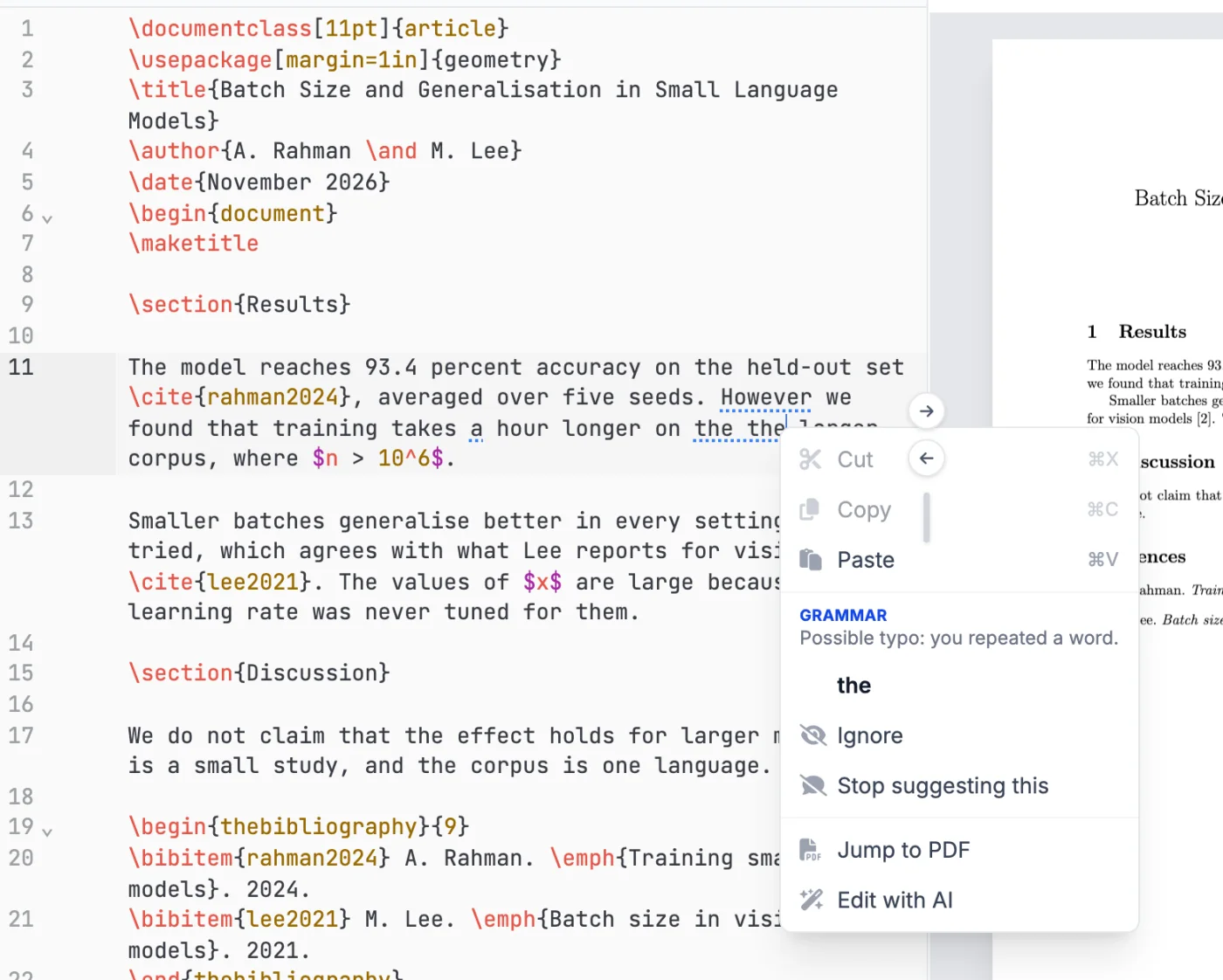
- Where the text goes. The checker is LanguageTool, running on servers LetX operates. Your text goes to nobody else, and no AI model reads it for this.
- What it costs. Grammar check is part of Pro, Academic Pro, Team and Institution. Spell check is free on every plan.
- What it does not do. It does not judge style, quotes, dashes or spacing, and it does not rewrite sentences. It is quiet on purpose, which means it misses things. For rewriting there is Lexi, the assistant in the same editor.
The grammar checkers that work on LaTeX are the ones that understand the markup, and most of them, in Overleaf, on the desktop and in LetX, are built on LanguageTool.
If you write in English in Overleaf and want it built in, switch on Overleaf’s AI features and use its language suggestions by Writefull, within your plan’s daily allowance.
If you write in Overleaf in another language, try the LanguageTool browser add-on, which covers more than 30 languages and shows spelling and simple punctuation in its free version.
If you want nothing to leave your computer, use LTeX+ in VS Code, which checks offline, or TeXstudio with LanguageTool installed beside it.
If you want one report for a whole thesis, run TeXtidote from the command line.
If you want grammar check inside a collaborative online editor, with no add-on and no second company, LetX has it built in as part of Pro.
A free collaborative LaTeX editor. Spell check is free; grammar check comes with Pro.
Open LetX FreeFrequently asked questions
Does Grammarly work with LaTeX?
Not officially. Grammarly’s support page says LaTeX files are not supported. Its browser extension does show suggestions inside Overleaf, but Overleaf’s documentation says Grammarly is not directly integrated, that this is not official support, and that Grammarly does not fully understand LaTeX markup, which occasionally leads to wrong suggestions.
Does Overleaf have a grammar checker?
Yes. Overleaf has a built-in spell checker, and its AI features include language suggestions by Writefull for grammar, spelling, word choice and sentence structure. You switch the AI features on in your account settings. They are free within daily limits, and a paid Overleaf plan raises the limits. Writefull’s own model reads English only; a GPT model covers other languages, and Writefull says text checked with it is sent to OpenAI’s servers.
What is a free grammar checker for LaTeX?
LTeX+ for Visual Studio Code, TeXstudio with LanguageTool, and TeXtidote are free and open source, and all three run on your own computer. In Overleaf, its language suggestions are free within daily limits and the LanguageTool add-on has a free version for spelling, simple punctuation and some style mistakes.
Is LTeX still maintained?
The original LTeX extension for VS Code was archived by its owner on 12 April 2026 and is read-only. LTeX+ continues it: a free extension that checks LaTeX, Markdown, Typst and other formats offline, with LanguageTool included.
Can LanguageTool check a LaTeX file?
Not by itself. LanguageTool’s own page says it does not strip TeX markup and recommends tools that do: its browser add-on in Overleaf, TeXtidote, TeXstudio and LTeX+. LetX also runs LanguageTool, behind a layer that reads LaTeX and tells it which parts are your sentences.
Does LetX have a grammar checker?
Yes. Grammar check is built into the LetX editor and is part of Pro, Academic Pro, Team and Institution; spell check is free. It reads sentences and leaves commands, maths and citations out, underlines a mistake with blue dots, and offers the fix in the right-click menu. It runs on LetX’s own servers, and the text goes to nobody else.
Related

Written by Shihab Shahriar Antor , AI Engineer & Founder of Shahriar Labs. Builder of LetX (collaborative LaTeX) and offSchool (SSC science and maths, learned through simulations).