Grammar check for LaTeX
LetX checks the grammar of a LaTeX document as you write it. It reads your sentences and leaves your commands, formulas, citation keys and code alone. A missing comma, a wrong article, a word typed twice or a verb that does not agree gets a dotted underline, and the fix is one right-click away. It is part of Pro. Spell check is free.
It reads the sentence, not the source
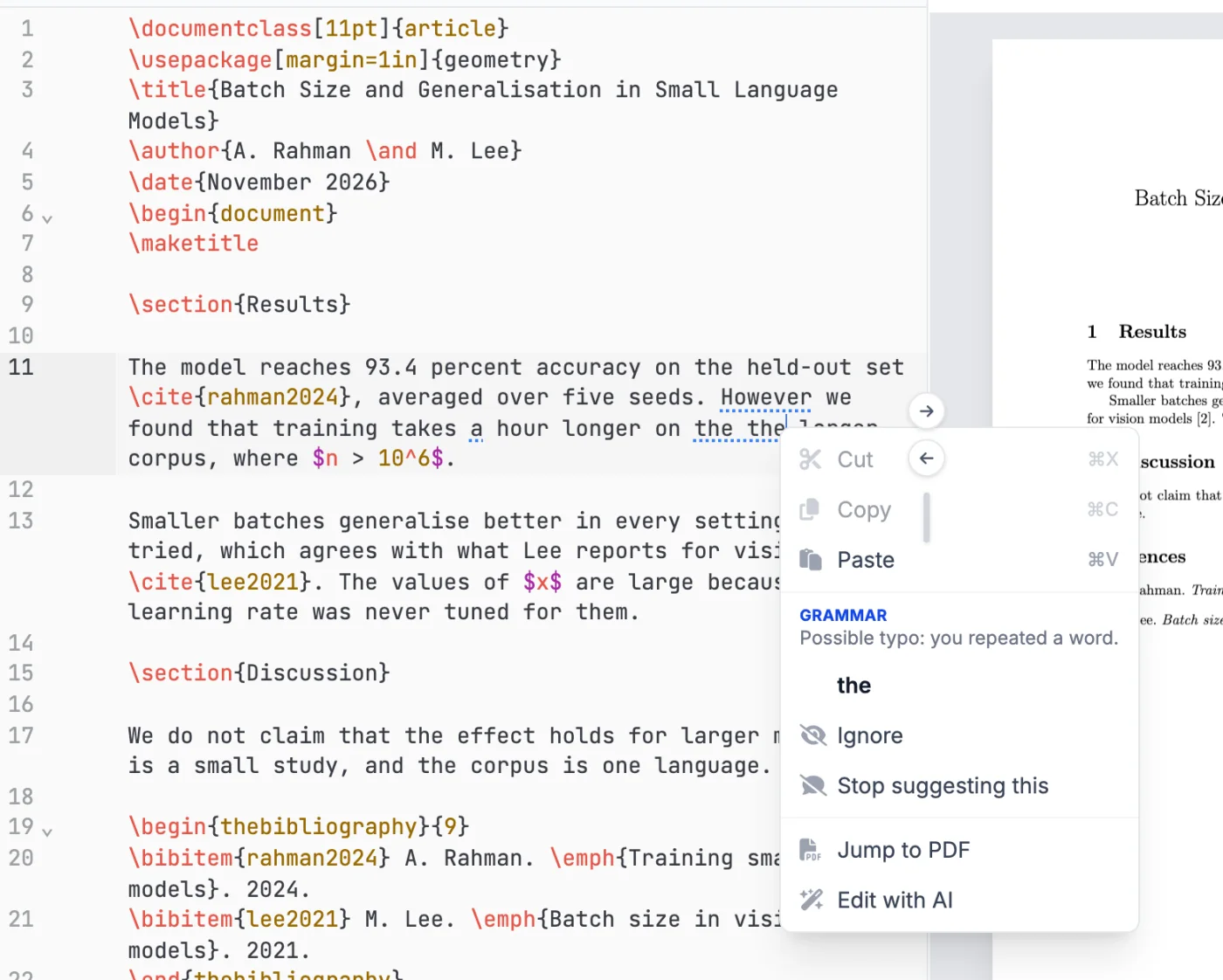
The model reaches 93.4 percent accuracy on the held-out set \cite{rahman2024}, averaged over five seeds. However we found that training takes a hour longer on the the larger corpus, where $n > 10^6$.
What it reads
- The text of your
.texfiles, from the abstract to the conclusion. - Headings, captions, footnotes and list items, each as a piece of its own.
- Words inside emphasis and bold, as part of their sentence.
What it leaves alone
- Commands and their options, and everything before
\begin{document}. - Maths, citation keys, labels and references.
- Code listings, inline code, web addresses and comments.
- Reference lists, and bibliography, style and data files.
The fix is in the right-click menu
A grammar suggestion is a blue dotted underline, so it is never taken for a misspelled word, which keeps its red wavy one. Right-click it and the editor’s own menu says what is wrong and offers the correction. Choosing it changes those words and nothing else, and undo takes it back. “Ignore” hides that one underline. “Stop suggesting this” switches that kind of suggestion off for your account.
Quiet on purpose
A checker that reads LaTeX source as plain text underlines half the page: every command, every bracket, every space before a citation. This one shows a suggestion only when it lies wholly in your own words, where one click can apply it.
- Quotes, dashes and spacing are not judged. In a source file they are TeX’s work, not a typing mistake.
- A verb next to a citation or a formula is not judged for agreement, because the check cannot know whether the citation names one author or four.
- Style is not judged. It will not tell you a sentence is too long or a word too plain.
The price of being quiet is that it misses things, and now and then a suggestion is wrong. It is a second pair of eyes for the mistakes a tired writer makes, not a copy editor.
As you write, or the whole file at once
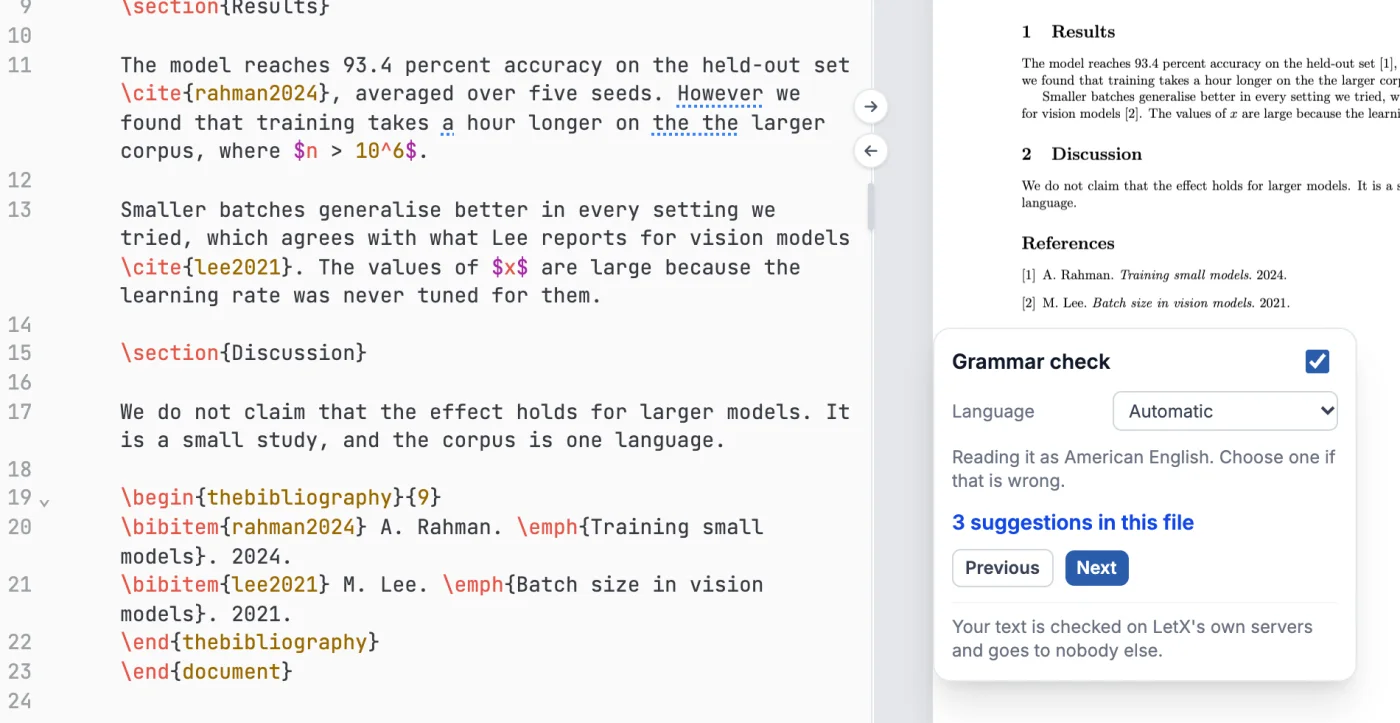
The paragraphs on your screen are checked when you pause typing. Before you submit, open the corner of the editor that says “Grammar on” and choose “Check the whole file”: it reads the open file from top to bottom and gives a count, with Next and Previous to walk through the suggestions one at a time. The same corner switches the check off and on and sets the language, and Settings has all of it too.
Languages
Left on “Automatic”, the check reads the language off each paragraph, so a thesis with an English abstract and a German body is read as both. You can also say which language your documents are in. In a language it does not know, nothing is underlined.
- English (United States, United Kingdom, Canada, Australia)
- German (Germany, Austria, Switzerland)
- French
- Spanish
- Portuguese (Brazil, Portugal)
- Italian
- Dutch (Netherlands, Belgium)
- Catalan
- Polish
- Russian
- Ukrainian
- Swedish
- Danish
- Greek
- Romanian
- Slovak
- Slovenian
- Galician
- Arabic
- Persian
- Japanese
- Chinese
For every language but English, misspelled words are underlined by the same check. English spelling is the free spell check’s job, on every plan.
Where your text goes
Your text is checked on LetX's own servers and goes to nobody else.
The checker is LanguageTool, open-source software that works by rules, running on servers LetX operates. No AI model reads your text for grammar check, and no outside service receives it. An unpublished paper stays between you and the editor you are writing it in. The privacy policy and the security page say who handles the rest of your data.
What is free, and what is part of Pro
Free, on every plan
- Spell check for English in the editor, with your own dictionary.
- The editor itself, with unlimited collaborators and every template.
Part of Pro, Academic Pro, Team and Institution
- Grammar check as you write, in every language above.
- The whole file on request, with a count.
- Spelling for the languages other than English.
Each person’s own plan decides, for anyone who can edit the project. Spell check stays free.
Other ways to check grammar in LaTeX
There are several, and some of them are free: a browser add-on, an extension for your desktop editor, a command-line tool. We read what each one says about itself and put them side by side in how to check grammar in a LaTeX document, with what each needs and what each costs. To have a paragraph rewritten rather than checked, that is Lexi, the assistant in the same editor.
Questions
Is grammar check free?
Spell check is free on every plan. Grammar check is part of Pro, Academic Pro, Team and Institution. Each person's own plan decides, so on a shared project a collaborator on the free plan sees spelling underlines and no grammar ones.
Does it understand LaTeX?
Yes. It reads your sentences, not your source. Commands, formulas, citation keys, labels, code and comments are left out, a citation is read as a reference and a formula as a thing, so the sentence around them is still judged as a sentence. A suggestion is shown only when it lies wholly in your own words, where one click can apply it.
Which languages does it check?
English, German, French, Spanish, Portuguese, Italian, Dutch, Catalan, Polish, Russian, Ukrainian, Swedish, Danish, Greek, Romanian, Slovak, Slovenian, Galician, Arabic, Persian, Japanese, Chinese. Left on Automatic, it reads the language off each paragraph, so a thesis with an English abstract and a German body is read as both. In a language it does not know, nothing is underlined.
Where does my text go?
Your text is checked on LetX's own servers and goes to nobody else. The checker is LanguageTool, open-source software that works by rules, running on servers LetX operates. No AI model reads your text for grammar check, and no outside service receives it.
Does it change my document?
Never by itself. A suggestion is applied only when you choose it from the right-click menu, and undo takes it back like any other edit. It does not rewrite sentences.
Can I switch off a suggestion I disagree with?
Yes. "Ignore" hides that one underline while the page is open. "Stop suggesting this" switches that kind of suggestion off for your account, in every project, and Settings lists what you switched off so you can bring one back.
Does it check the whole document?
It checks the paragraphs on your screen when you pause typing. "Check the whole file", in the corner of the editor, reads the whole open file and gives a count, with Next and Previous to walk through the suggestions. It reads .tex files; bibliography, style and data files are not checked.
How is it different from Lexi?
Lexi is the AI assistant in the editor: it rewrites a paragraph, fixes a build error or makes a table when you ask. Grammar check is not AI and rewrites nothing. It points at a mistake as you write and offers the standard correction. The two work side by side.
Write the paper. Let the editor catch the typos.
The editor and spell check are free. Grammar check comes with Pro.
Open the free editor